How the Two-Tier Model Actually Works
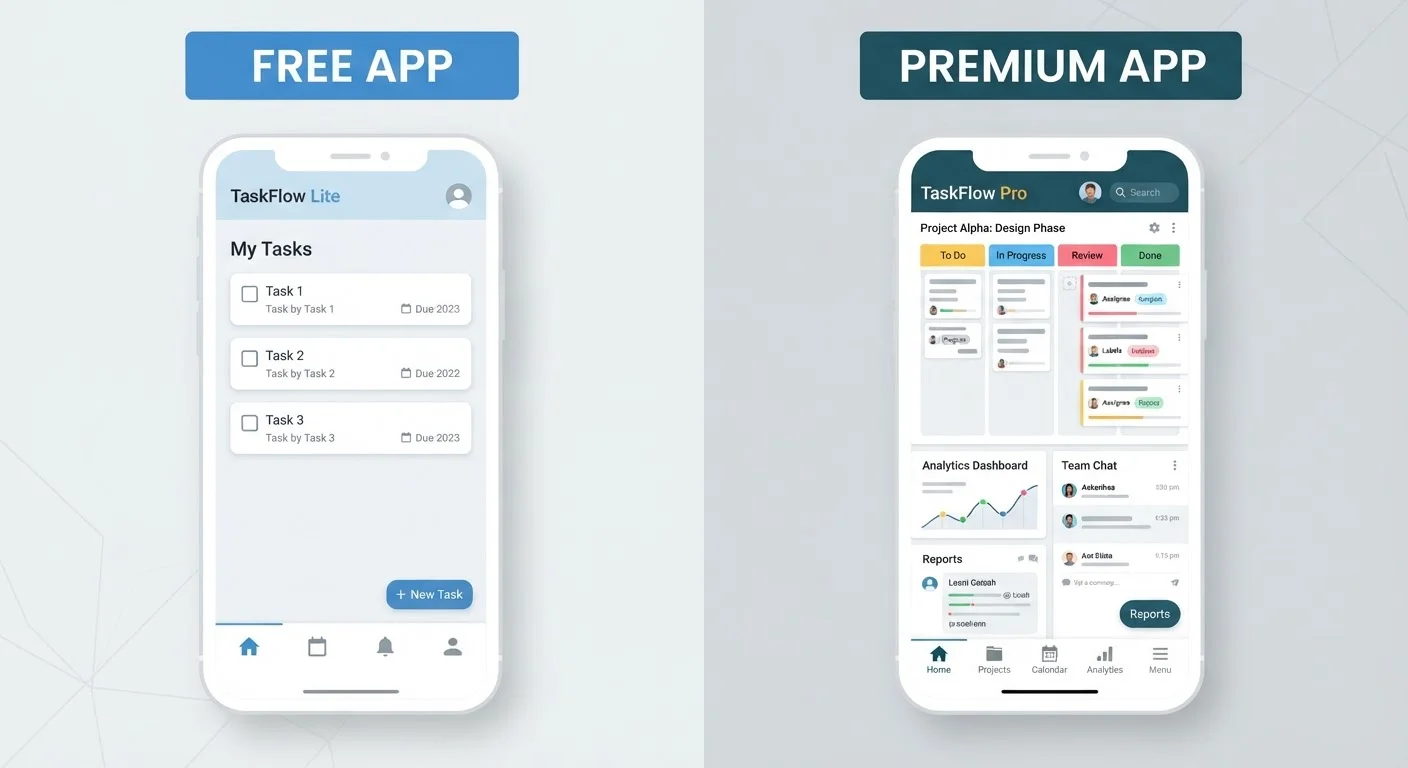
Nearly every major app today uses a freemium model - a portmanteau of "free" and "premium" that describes offering a basic version at no cost alongside a paid upgrade. The free tier isn't charity; it's a calculated strategy to get you into the product, demonstrate value, and eventually convert you into a paying customer.
Understanding this helps you read a pricing page with clearer eyes. Developers design the free tier to be genuinely useful enough to keep you engaged, but limited enough that power users feel the ceiling. Those limits tend to cluster around a few predictable areas: storage caps, export restrictions, the number of projects or users allowed, and how frequently you can perform certain actions.
If you find yourself keeping apps you barely use, it's worth reading about how app overload affects your device before stacking up more free tiers.
What You Typically Gain in the Free Tier
Free tiers genuinely deliver in several ways. You get zero financial risk while exploring whether a tool fits your workflow. Most productivity apps, note-taking tools, and creative platforms let free users create, save, and share - just within tighter boundaries.
Free tiers also tend to cover the core use case well. A free task manager can still organize your to-do list. A free design tool can still produce a usable graphic. The gap between free and paid is usually about scale and convenience, not fundamental capability.
| Free Tier | Paid Tier | |
|---|---|---|
| Cost | No monetary cost | Monthly or annual subscription |
| Ads | Usually present | Typically removed |
| Storage | Capped (often 2-15 GB) | Higher or unlimited |
| Collaboration | Limited users or features | Full team access |
| Export options | Restricted formats or watermarked | Full format access |
| Version history | Recent versions only | Extended or full history |
| Customer support | Community forums | Direct or priority support |
| Privacy trade-offs | Higher (ad-based data use) | Lower (revenue from subscription) |
That said, the free experience often comes with trade-offs that aren't loudly advertised. Ads are the most visible one. Less visible is data collection: many ad-supported apps track usage behavior to target advertising or share aggregated data with third parties. For a deeper look at this dynamic, see the data practices common in free apps.
What You Quietly Lose on the Free Tier
The losses on a free tier are often subtle until they aren't. Here are the most common friction points:
- Storage and file limits: Cloud tools frequently cap how much you can store or how large individual files can be. This rarely matters on day one and becomes a real problem months later.
- Export and sharing restrictions: Some apps let you create content freely but charge to export it in a useful format (PDF, high-resolution image, CSV). You may not notice until you need to hand something off.
- Collaboration ceilings: Many free tiers allow only one user or a small team. If you share work with others, you'll hit this wall quickly.
- Version history: Free tiers often keep only your most recent version, meaning accidental changes can't be rolled back.
- Priority support: Free users typically rely on community forums; paid users get direct help.
Test the Ceiling Before You Pay
Most apps will tell you exactly when you've hit a free-tier limit - a banner, a modal, or a locked button. Screenshot or note those moments over a few weeks. If the same wall keeps appearing, that's a signal the upgrade has real value for you. If it appears once and never again, wait.
Before upgrading, check whether the specific limit you're hitting is a one-time inconvenience or something you'll encounter weekly. Paying monthly for a feature you need twice a year rarely pencils out - and it's worth understanding how subscription costs compound over time.
Making the Upgrade Decision With Less Guesswork
The cleanest framework for deciding whether to pay is to ask: Is the free tier blocking a task I perform regularly, or just one I might perform eventually? Most app publishers want you to upgrade before you've confirmed the need - watch for that pressure.
A few practical steps help cut through the noise:
- Use the free tier for at least two to four weeks before forming an opinion. Initial impressions often overestimate what you need.
- List the specific features behind the paywall that you actually reached for. If the list is short or vague, the upgrade may not be worth it yet.
- Check what permissions the app requests regardless of tier. Free or paid, an app asking for access it doesn't need is worth scrutinizing. Our guide on keeping apps secure covers permission reviews in plain language.
- Look for annual billing options if you do decide to upgrade - these typically reduce the per-month cost compared to monthly billing.
The goal isn't to avoid paying for apps - it's to pay for apps that genuinely earn it in your specific workflow.